

This request changes a line of credit account's statement date.
Click here to learn more about this request
Each billing cycle has an associated statement date. If necessary, statement dates can be changed. Note the following when using this request:
This request changes the date on which statements come due moving forward. Making this change will have a lasting effect on subsequent billing periods as well. For example, moving a statement date to the 15th day of the current month will ensure that all statement dates moving forward will land on the 15th of future months.
This endpoint has two capabilities: changing due dates and changing statement dates. These two actions are separate from each other, and determining which action you'd like to make is achieved with the type field within the payload. For information on how to change a statement date, see the POST Change due date request.
Statement date changes take effect on the apply date. The system will verify which period the apply date is in and change the statement date that's associated with that period.
Changing a statement date does not also change the account due date. To change a due date, see the POST Change due date request.
Here's an example of how changing a statement date affects the account:
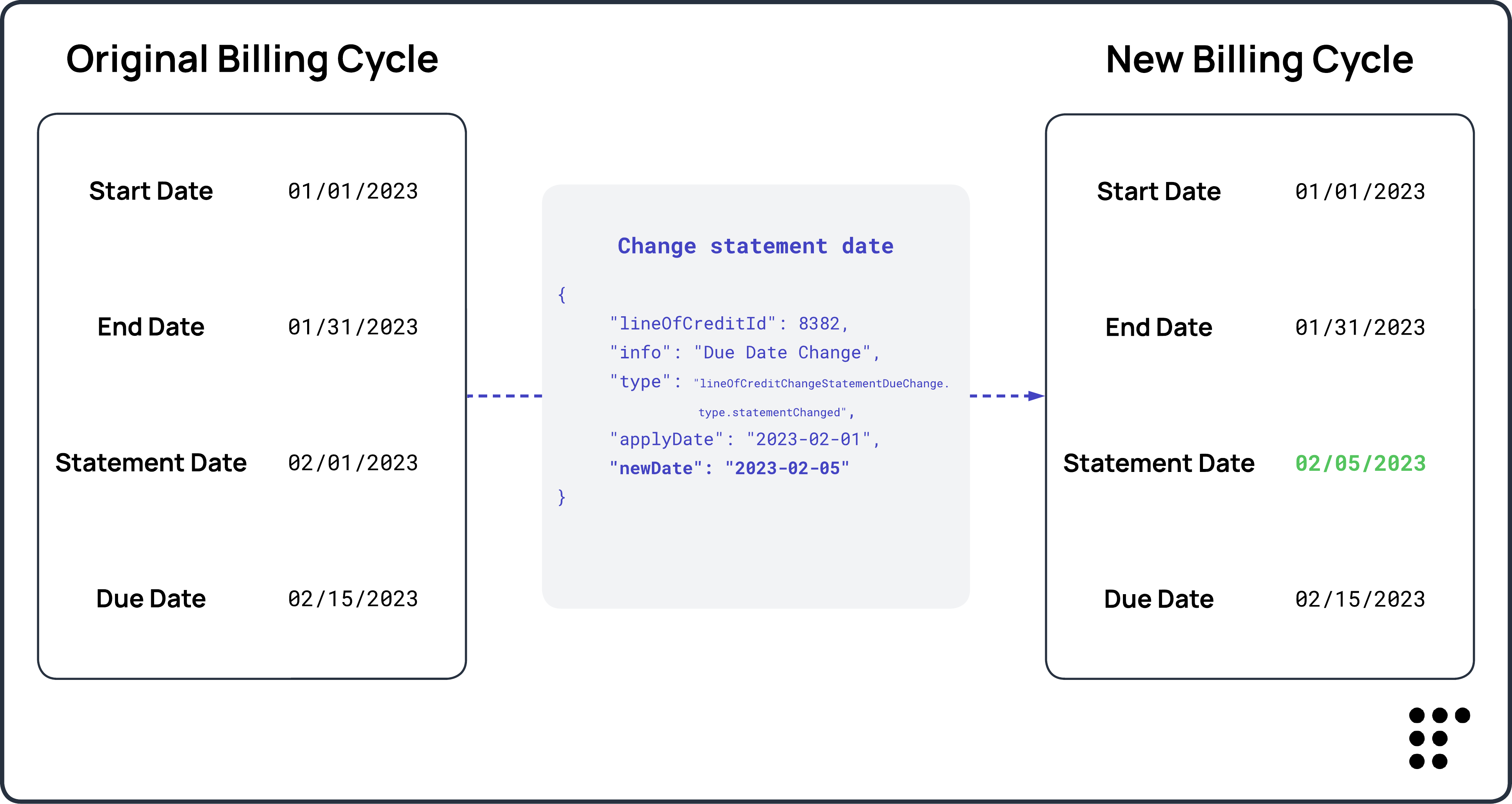
Changes to statement dates might impact other account calculations.
Statement dates and due dates are operationally linked together: Adjusting one without considering the other may impact billing cycle timing, grace periods, and minimum payment calculations. To learn more about date change implications, read our Line of credit statement and due date alignment article.
This request interacts with Compliance Guardrails.
Compliance Guardrails are a LoanPro feature that helps ensure actions taken on accounts are done so compliantly with lending laws. Once configured, these guardrails are applied to a line of credit program, ensuring all accounts within that program adhere to the same compliance standards.
Guardrails are configurable, allowing you to set rule criteria for which accounts should either result in a warning or an error. If your request attempt is flagged by a guardrail, a
409response code is returned along with one of the following responses:{ "error": { "message": "", "type": "GuardrailEvaluationException", "code": 409 }, "warnings": [ "<p>CARD Act Warning: This is a configurable warning message.</p>" ] }{ "error": { "message": "CARD Act Compliance: This is a configurable error message.", "type": "GuardrailEvaluationException", "code": 409 } }Guardrail flags can be ignored for testing purposes by adding
"ignoreGuardrailWarnings": trueto the payload of this request.
Database
For more information regarding due date database tables, see the following articles:
- Database – Line of Credit Change Statement Due Date Entity (line_of_credit_change_statement_due_date_entity)
- Database - Line of Credit Statements (line_of_credit_statement_template_entity)
{
     "lineOfCreditId": 8382,
     "info": "Due Date Change",
     "type": "lineOfCreditChangeStatementDueChange.type.statementChanged",
     "applyDate": "2023-02-01",
     "newDate": "2023-02-05",
     "ignoreGuardrailWarnings": false
}