

This request shows how to upload a document using Smart Checklists.
This set of requests will show you how to upload a document using the Smart Checklist document upload feature.
This feature requires 4 steps. These steps will update the Smart Checklist values, statuses, and upload a document into the Smart Checklist object.
Step 1 - Assign Smart Checklist Status
The first step is to update the Smart Checklist status. To do so, send a PUT request to the following URL:
https://loanpro.simnang.com/api/public/api/1/odata.svc/Loans({loanID})
Parameters:
loanID: The ID of the loan.
This request is to set the Checklist Status to "Pending Upload" (ID: 24) for the specified checklist. Smart Checklist ID's can be found by navigating to Settings > Loan > Smart Checklist. Smart Checklist Status ID's can be found by navigating to Settings > Loan > Labeling > Smart Checklist.
This request requires a JSON payload and is formatted like the example below:
{
  "ChecklistItemValues": {
    "results": [
      {
        "checklistItemId": {checklistID},
        "statusId": 24
      }
    ]
  }
}
Step 2 - Retrieve the Attachments ID
The second step is to capture the ID of the attachments object that the document will be uploaded into. To do so, send a GET request to the following URL:
https://loanpro.simnang.com/api/public/api/1/odata.svc/Loans(loanID)?nopaging=true&$expand=ChecklistItemValues/Attachments/StatusCatalog
Parameters:
loanID: The ID of the loan.
Capture the returned id for use in the next step.
Step 3 - Upload the file
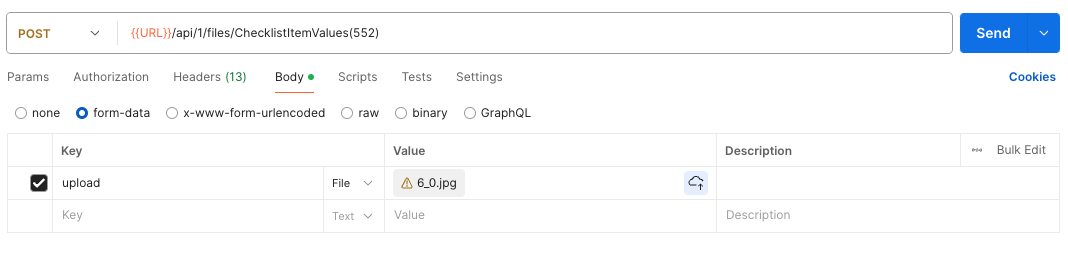
The third step is to upload the file into the checklist item values object. To do so, send a POST request to the following URL:
https://loanpro.simnang.com/api/public/api/1/files/ChecklistItemValues({checklistValueID})
Parameters:
checklistValueID: The ID of the checklist item value.
The payload of the request will be a binary file upload.
Step 4 - Update Smart Checklist Status
The fourth step is to update the Smart Checklist status. To do so, send a PUT request to the following URL:
<https://loanpro.simnang.com/api/public/api/1/odata.svc/Loans({loanID})
Parameters:
loanID: The ID of the loan.
This request is to set the status of the Checklist Status to "Submitted" (ID: 2) for the specified checklist.
This request requires a JSON payload and is formatted like the example below:
{
  "ChecklistItemValues": {
    "results": [
      {
        "checklistItemId": {checklistID},
        "statusId": 2
      }
    ]
  }
}
Additional Requests
The following requests can be referenced to retrieve Smart Checklist Item and Document values and statuses:
Retrieve Smart Checklist and Statuses
This request retrieves a Smart Checklist's item ID and status ID. To do this, send a GET request to the following URL:
https://loanpro.simnang.com/api/public/api/1/odata.svc/Loans(loanID)?nopaging=true&$expand=ChecklistItemValues/Attachments/StatusCatalog,ChecklistItemValues/StatusCatalog
Parameters:
loanID: The ID of the loan.
Capture the following values from the response:
checklistItemId
statusId
Retrieve Document Statuses
This request retrieves a document status. To do this, send a GET request to the following URL:
https://loanpro.simnang.com/api/public/api/1/odata.svc/Loans(id=loanID)?nopaging=true&$expand=ChecklistItemValues/Attachments/StatusCatalog
Parameters:
LoanID: The ID of the loan.
Capture the following values from the response:
statusCatalogId